Archive for July 2012

Creating a drill down chart with ASP.NET and MSChart

In my first post, A basic reporting chart in ASP.NET, I went over the basics of creating a report using MSChart and ASP.NET and this was quit easy. However, in today’s world where the importance of business intelligence is ever increasing, the ability to drill down on a report has become the de facto standard. MSChart, ASP.NET, and HTML make it easy to create a drill-down report.

Note: Microsoft has a drill-down report in their ChartSamples example, but it was bundled as part of the same project with two-hundred other reports and was not a minimal example. It requires the use of an Access database (and I had nothing to read Access with), it has a bunch of javascript code that is for a tooltip preview of the drill down report, and the charts are in two objects. All of this made it more difficult for me to break this down.  In this example, the report will be its own ASP.NET project and will be a minimal example, however the use case and the sample data is taken directly from Microsoft’s example.

Report Example Use Case

Imagine you have a list of sales reps, their regions, and their sales results. You want a report to look at total sales per region. Then you want to click on a region to the see the sales by sales rep.

Download the project here: SampleChart.zip

Step 1 – Create the Visual Studio project

  1. In Visual Studio, click on File | New | Project.
  2. Select Visual C# | Web from the Installed Templates.
  3. Locate and select ASP.NET Empty Web Application.
    Note: I like to demonstrate using an Empty project you nothing is done for you, and you have to learn everything you actually need to do.
  4. Give the project a name.
    I named mine DrillDownChart because that is my example’s purpose.
  5. Click OK.
  6. Right-click on the newly created project and click Add | Reference.
  7. Select the .NET tab.
  8. Locate System.Web.DataVisualization and highlight it.
  9. Click OK.

Step 2 – Add a web form for your chart

  1. Right-click on the Project and choose Add |  New Item.
  2. Select Web Form.
  3. Give the file a name.
    I named my file  Report.aspx.
  4. Click OK.

Step 3 – Create a data object for the report

Because data is often coming from a database, this example is going to use a DataSet. I am not going to connect to a database, but just use a statically build DataSet.

  1. Right-click on the Project and choose Add |  Class.
  2. Give the file a name.
    I named my file  SalesDataSet.cs.
  3. Make the class inherit from DataSet.
  4. Click OK.

Step 4 – Add example data to the data object for the report

While in a real world scenario, you would get the data from a database or somewhere, lets first just create some sample data. We are going to create two simple tables. One is a Region table, that has the region name and ID. One is a RepSales table that has sales per rep and the rep’s region id.

  1. Create a property with only a getter that creates a region DataTable called RegionTable.
  2. Add the columns needed: RegionID and RegionName.
  3. Add the appropriate rows.
  4. Create a property with only a getter that creates a reps sales DataTable called RepsSalesTable.
  5. Add the columns needed: ID, Name, RegionID, and Sales.
  6. Add the appropriate rows.
  7. Now in your constructor, add those to the list of Tables in your object.
    using System;
    using System.Collections.Generic;
    using System.Linq;
    using System.Web;
    using System.Data;
    
    namespace DrillDownChart
    {
        public class SalesDataSet : DataSet
        {
            public SalesDataSet()
            {
                Tables.Add(RegionTable);
                Tables.Add(RepsSalesTable);
    
            }
    
            public DataTable RegionTable
            {
                get
                {
                    if (_RegionTable == null)
                    {
                        List<String> Regions = new List<string>() { "East", "West", "Central", "International", "South" };
    
                        _RegionTable = new DataTable("Region");
                        _RegionTable.Columns.Add("RegionID", typeof(int));
                        _RegionTable.Columns.Add("RegionName", typeof(string));
    
                        int i = 0;
                        foreach (var region in Regions)
                        {
                            DataRow row = _RegionTable.NewRow();
                            row["RegionID"] = ++i;
                            row["RegionName"] = region;
                            _RegionTable.Rows.Add(row);
                        }
    
                    }
                    return _RegionTable;
                }
            } private DataTable _RegionTable;
    
            public DataTable RepsSalesTable
            {
                get
                {
                    if (_RepsSalesTable == null)
                    {
                        List<String> reps = new List<string>() {
                            "Aaron", "Larry", "Andrew", "Mary", "Sally", "Nguyen", "Francis",
                            "Jerry", "Danny", "Jim", "Sarah", "Hannah", "Kim", "Gerry", "Bob" };
                        int[] regions = { 1, 2, 3, 1, 4, 2, 4, 3, 1, 2, 2, 3, 5, 5, 5 };
                        int[] sales = { 10440, 17772, 23880, 7663, 21773, 32294, 11983, 14991,
                                        17946, 8551, 19443, 27887, 30332, 16668, 21225 };
    
                        _RepsSalesTable = new DataTable("RepsSales");
                        _RepsSalesTable.Columns.Add("ID", typeof(int));
                        _RepsSalesTable.Columns.Add("Name", typeof(string));
                        _RepsSalesTable.Columns.Add("RegionID", typeof(int));
                        _RepsSalesTable.Columns.Add("Sales", typeof(int));
    
                        for (int i = 0; i < reps.Count; i++)
                        {
                            DataRow row = _RepsSalesTable.NewRow();
                            row["ID"] = i + 1;
                            row["Name"] = reps[i];
                            row["RegionID"] = regions[i];
                            row["Sales"] = sales[i];
    
                            _RepsSalesTable.Rows.Add(row);
                        }
    
                    }
                    return _RepsSalesTable;
                }
            } private DataTable _RepsSalesTable;
        }
    }
    

That is it, your fake example data is prepared.

Step 5 – Add a Chart to the Report.aspx file

  1. Open the Report.aspx file.
  2. Add a Register to the System.Web.DataVisualization assembly.
  3. Locate the div inside the body.
  4. Inside the div, add a Chart that includes a ChartArea.
    <%@ Page Language="C#" AutoEventWireup="true" CodeBehind="Report.aspx.cs" Inherits="CompareYearsByQuarter.Report" %>
    
    <%@ Register Assembly="System.Web.DataVisualization, Version=4.0.0.0, Culture=neutral, PublicKeyToken=31bf3856ad364e35"
        Namespace="System.Web.UI.DataVisualization.Charting" TagPrefix="asp" %>
    
    <!DOCTYPE html PUBLIC "-//W3C//DTD XHTML 1.0 Transitional//EN" "http://www.w3.org/TR/xhtml1/DTD/xhtml1-transitional.dtd">
    <html xmlns="http://www.w3.org/1999/xhtml">
    <head runat="server">
        <title></title>
    </head>
    <body>
        <form id="form1" runat="server">
        <div>
            <asp:Chart ID="SalesReport" runat="server">
                <chartareas>
                    <asp:ChartArea Name="ChartArea1">
                    </asp:ChartArea>
                </chartareas>
            </asp:Chart>
        </div>
        </form>
    </body>
    </html>
    

Step 6 – Add code the Report.aspx.cs file

We are going to use the same object for both the original report and the drill down report. We will just a little code that switches which data the chart is populated with.

  1. Open the Report.aspx.cs file.
  2. Create an instance of the SalesDataSet object that has our sample data.
  3. Add code in the Page_Load method to configure the Chart.
    Note 1: The steps for this code is in the code and comments itself. I created a method for each step and then populated the methods as  needed.
    Note 2: Notice that the AddDataToSeries() method uses and if statement to determine whether to add the original data or the drill down data.
    Note 3: Because we used a DataTable we query the example data using LINQ. It is likely that in your production reports you are using a real database and you will probably use queries directly to your database.

    using System;
    using System.Collections.Generic;
    using System.Linq;
    using System.Web;
    using System.Web.UI;
    using System.Web.UI.WebControls;
    using System.Data;
    using System.Web.UI.DataVisualization.Charting;
    
    namespace DrillDownChart
    {
        public partial class RegionReport : System.Web.UI.Page
        {
            // Step 1 - Create Example Data
            SalesDataSet ExampleData = new SalesDataSet();
    
            protected void Page_Load(object sender, EventArgs e)
            {
                // Step 2 - Populate chart drop down
                PopulateChartTypeDropDown();
    
                // Step 3 - Create Series
                Series series = CreateSeries();
    
                // Step 4 - Set the chart type
                SetChartType(series);
    
                // Step 5 - Add data (and if needed drilldown links to series)
                AddDataToSeries(series);
    
                // Step 6 - Add series into the chart's series collection
                SalesReport.Series.Add(series);
            }
    
            private void PopulateChartTypeDropDown()
            {
                List<String> chartTypes = new List<String>(Enum.GetNames(typeof(SeriesChartType)));
                chartTypes.Insert(0, "");
    
                foreach (var item in chartTypes)
                {
                    DropDownListChartType.Items.Add(item);
                }
            }
    
            private Series CreateSeries()
            {
                Series series = new Series("Sales");
                series.BorderWidth = 3;
                series.ShadowOffset = 2;
                return series;
            }
    
            private void SetChartType(Series inSeries)
            {
                if (Page.Request["ChartType"] != null)
                    DropDownListChartType.SelectedValue = Page.Request["ChartType"];
    
                if (DropDownListChartType.SelectedValue.ToString() == "")
                    DropDownListChartType.SelectedValue = SeriesChartType.Column.ToString();
    
                inSeries.ChartType = (SeriesChartType)System.Enum.Parse(typeof(SeriesChartType), DropDownListChartType.SelectedValue.ToString());
            }
    
            private void AddDataToSeries(Series series)
            {
                if (Page.Request["ChartType"] == null)
                    AddAllRegionData(series);
                else
                    AddSpecificRegionData(series);
            }
    
            private void AddAllRegionData(Series series)
            {
                DataTable sales = ExampleData.Tables["RepsSales"];
                DataTable regions = ExampleData.Tables["Region"];
    
                var query = from reps in sales.AsEnumerable()
                            join region in regions.AsEnumerable()
                            on reps.Field<int>("RegionID") equals region.Field<int>("RegionID")
                            group reps by region.Field<string>("RegionName") into regionGroup
                            select new { Region = regionGroup.Key, Sales = regionGroup.Sum(total => total.Field<int>("Sales")) };
    
                // Populate new series with data
                foreach (var value in query)
                {
                    series.Points.AddXY(value.Region, value.Sales);
                }
    
                // Step 7 - Make this series drillable
                for (int i = 0; i < series.Points.Count; i++)
                {
                    series.Points[i].Url = string.Format("RegionReport.aspx?region={0}&ChartType={1}", series.Points[i].AxisLabel, DropDownListChartType.SelectedValue);
                }
            }
    
            private void AddSpecificRegionData(Series series)
            {
                var query = from reps in ExampleData.RepsSalesTable.AsEnumerable()
                            join region in ExampleData.RegionTable.AsEnumerable()
                            on reps.Field<int>("RegionID") equals region.Field<int>("RegionID")
                            where region.Field<string>("RegionName") == (Page.Request["Region"] ?? "East")
                            select new { RepName = reps.Field<string>("Name"), Sales = reps.Field<int>("Sales") };
    
                // Populate new series with data
                foreach (var value in query)
                {
                    series.Points.AddXY(value.RepName, value.Sales);
                }
    
                // Step 7 - Make this series drillable
                for (int i = 0; i < series.Points.Count; i++)
                //{
                //    // Add drill down code to drill to a third chart
                //}
            }
    
            private void AddDrillDown(Series series)
            {
                for (int i = 0; i < series.Points.Count; i++)
                {
                    series.Points[i].Url = string.Format("RegionReport.aspx?region={0}&ChartType={1}", series.Points[i].AxisLabel, DropDownListChartType.SelectedValue);
                }
            }
        }
    }
    

Step 7 – Add an http handler to the Web.Config for the Chart

  1. Open the Web.Config file.
  2. Add an http handler for the chart.
<?xml version="1.0"?>
<configuration>
  <system.web>
    <compilation debug="true" targetFramework="4.0" />
    <httpHandlers>
      <add path="ChartImg.axd" verb="GET,HEAD,POST" validate="false"
           type="System.Web.UI.DataVisualization.Charting.ChartHttpHandler, System.Web.DataVisualization, Version=4.0.0.0, Culture=neutral, PublicKeyToken=31bf3856ad364e35" />
    </httpHandlers>
  </system.web>
</configuration>

Your project is now complete.

You now have a report that shows you the total sales per region.

Click on the report and you have the sales per region broken out by sales rep.

And your done.

Download the project here: SampleChart.zip
A basic reporting chart in ASP.NET

It is time to learn to write some charts. By charts I mean graphic views for reporting on data.

Obtaining MSChart

For .NET 4, MSChart is included in the .NET Framework, so if you have installed .NET 4, you have already obtained MSChart.

For .NET 3.5, the MSChart project which was an add-on. If you are using .NET 3.5, you need to download and install the add-on.

Note: I am using .NET 4 and it was installed with Visual Studio 2010, so I have no need to install the add-on.

Also, we are going to the very minimal steps manually. Many of these steps may be done for you (for example, the Visual Studio Designer will populate the Web.Config for you, but it is always good to know how do things yourself.

Report Example Use Case

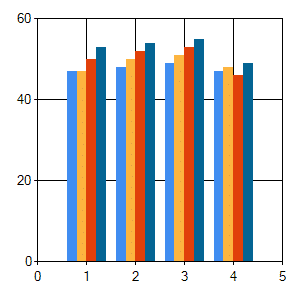
Imagine you have sales trending for four years, 2009-2012, and you want to visualize this trend. You want a chart that should all four years, with the quarter results next to each other.

Download the project here: SampleChart.zip

Step 1 – Create the Visual Studio project

  1. In Visual Studio, click on File | New | Project.
  2. Select Visual C# | Web from the Installed Templates.
  3. Locate and select ASP.NET Empty Web Application.
    Note: I like to demonstrate using an Empty project you nothing is done for you, and you have to learn everything you actually need to do.
  4. Give the project a name.
  5. Click OK.
  6. Right-click on the newly created project and click Add | Reference.
  7. Select the .NET tab.
  8. Locate System.Web.DataVisualization and highlight it.
  9. Click OK.

Step 2 – Add a web form for your chart

  1. Right-click on the Project and choose Add |  New Item.
  2. Select Web Form.
  3. Give the file a name.
    I named my file  Report.aspx.
  4. Click OK.

Step 3 – Create a data object for the report

  1. Right-click on the Project and choose Add |  Class.
  2. Give the file a name.
    I named my file  Data.cs.
  3. Click OK.

Step 4 – Add example data to the data object for the report

While in a real world scenario, you would get the data from a database or somewhere, lets first just create some sample data.

  1. Create a few lists of numbers, one for each year as shown.
    namespace CompareYearsByQuarter
    {
        public class Data
        {
            public int[] Sales2009 = new int[] { 47, 48, 49, 47 };
            public int[] Sales2010 = new int[] { 47, 50, 51, 48 };
            public int[] Sales2011 = new int[] { 50, 52, 53, 46 };
            public int[] Sales2012 = new int[] { 53, 54, 55, 49 };
        }
    }
    

That is it, your fake example data is prepared.

Step 5 – Add a Chart to the Report.aspx file

  1. Open the Report.aspx file.
  2. Add a Register to the System.Web.DataVisualization assembly.
  3. Locate the div inside the body.
  4. Inside the div, add a Chart that includes a ChartArea.
    <%@ Page Language="C#" AutoEventWireup="true" CodeBehind="Report.aspx.cs" Inherits="CompareYearsByQuarter.Report" %>
    
    <%@ Register Assembly="System.Web.DataVisualization, Version=4.0.0.0, Culture=neutral, PublicKeyToken=31bf3856ad364e35"
        Namespace="System.Web.UI.DataVisualization.Charting" TagPrefix="asp" %>
    
    <!DOCTYPE html PUBLIC "-//W3C//DTD XHTML 1.0 Transitional//EN" "http://www.w3.org/TR/xhtml1/DTD/xhtml1-transitional.dtd">
    <html xmlns="http://www.w3.org/1999/xhtml">
    <head runat="server">
        <title></title>
    </head>
    <body>
        <form id="form1" runat="server">
        <div>
            <asp:Chart ID="SalesReport" runat="server">
                <chartareas>
                    <asp:ChartArea Name="ChartArea1">
                    </asp:ChartArea>
                </chartareas>
            </asp:Chart>
        </div>
        </form>
    </body>
    </html>
    

Step 6 – Add code the Report.aspx.cs file

  1. Open the Report.aspx.cs file.
  2. Create an instance of the Data object that has our sample data.
  3. Add code in the Page_Load method to configure the Chart a separate series of data for each year.
    using System;
    using System.Collections.Generic;
    using System.Linq;
    using System.Web;
    using System.Web.UI;
    using System.Web.UI.WebControls;
    using System.Web.UI.DataVisualization.Charting;
    
    namespace CompareYearsByQuarter
    {
        public partial class Report : System.Web.UI.Page
        {
            Data data = new Data();
    
            protected void Page_Load(object sender, EventArgs e)
            {
                Series year2009 = new Series("Sales 2009");
                // Populate new series with data
                foreach (var value in data.Sales2009)
                {
                    year2009.Points.AddY(value);
                }
                SalesReport.Series.Add(year2009);
    
                Series year2010 = new Series("Sales 2010");
                // Populate new series with data
                foreach (var value in data.Sales2010)
                {
                    year2010.Points.AddY(value);
                }
                SalesReport.Series.Add(year2010);
    
                Series year2011 = new Series("Sales 2011");
                // Populate new series with data
                foreach (var value in data.Sales2011)
                {
                    year2011.Points.AddY(value);
                }
                SalesReport.Series.Add(year2011);
    
                Series year2012 = new Series("Sales 2012");
                // Populate new series with data
                foreach (var value in data.Sales2012)
                {
                    year2012.Points.AddY(value);
                }
                SalesReport.Series.Add(year2012);
            }
        }
    }
    

Step 7 – Add an http handler to the Web.Config for the Chart

  1. Open the Web.Config file.
  2. Add an http handler for the chart.
<?xml version="1.0"?>
<configuration>
  <system.web>
    <compilation debug="true" targetFramework="4.0" />
    <httpHandlers>
      <add path="ChartImg.axd" verb="GET,HEAD,POST" validate="false"
           type="System.Web.UI.DataVisualization.Charting.ChartHttpHandler, System.Web.DataVisualization, Version=4.0.0.0, Culture=neutral, PublicKeyToken=31bf3856ad364e35" />
    </httpHandlers>
  </system.web>
</configuration>

You are done. Build and look at your report.

You now have a simple report that should show you the sales trend for quarters 1,2,3,4 over four years. Your chart should look like this.

Download the project here: SampleChart.zip

A non-compete and single ownership version of the BSD License

I recently created an API and I wanted to give it a license where it is free for anyone to use, so I was planning on using the two-clause BSD License. However, after further thought, I realized that I had a few more stipulations I wanted to add. Yes, I wanted the software to be free to use, however, there are a few things I don’t want.

  1. I don’t really want someone to fork my project just yet. I want the project to remain in one place.
  2. I want the project to be free and commercial friendly, including free to use the code, or link to a binary in any way.
  3. I don’t want a company to use my software to sell a competing solution unless I am compensated. In which case, I can license the software to them under a commercial license.
  4. If anyone contributes to the project, I would like the right to sell the code under a different (possibly commercial) license. This prevents license and author sprawl. The fourth clause is crossed out because this will be done at commit time and is not needed in the license of existing source code.

Non-compete line addition to the new BSD License

So I came up with two one more line to the new BSD License: a third line prohibiting competing projects or solutions without permission; a fourth line that states that any contributions to the project will result in the all rights to the contributed code being assigned back to me. This will be done at commit time and is not needed in the license of existing source code.

<Project> <Project Description>
Copyright (c) <Year>, <Owner>
All rights reserved.

Redistribution and use in source and binary forms, with or without
modification, are permitted provided that the following conditions are met:

1. Redistributions of source code must retain the above copyright notice, this
   list of conditions and the following disclaimer.
2. Redistributions in binary form must reproduce the above copyright notice,
   this list of conditions and the following disclaimer in the documentation
   and/or other materials provided with the distribution.
3. Use of the source code or binaries that in any way competes with <Project>,
   whether open source or commercial or other, is prohibited unless permission
   is granted under a separate license by <Owner>.

THIS SOFTWARE IS PROVIDED BY THE COPYRIGHT HOLDERS AND CONTRIBUTORS "AS IS" AND
ANY EXPRESS OR IMPLIED WARRANTIES, INCLUDING, BUT NOT LIMITED TO, THE IMPLIED
WARRANTIES OF MERCHANTABILITY AND FITNESS FOR A PARTICULAR PURPOSE ARE
DISCLAIMED. IN NO EVENT SHALL THE COPYRIGHT OWNER OR CONTRIBUTORS BE LIABLE FOR
ANY DIRECT, INDIRECT, INCIDENTAL, SPECIAL, EXEMPLARY, OR CONSEQUENTIAL DAMAGES
(INCLUDING, BUT NOT LIMITED TO, PROCUREMENT OF SUBSTITUTE GOODS OR SERVICES;
LOSS OF USE, DATA, OR PROFITS; OR BUSINESS INTERRUPTION) HOWEVER CAUSED AND
ON ANY THEORY OF LIABILITY, WHETHER IN CONTRACT, STRICT LIABILITY, OR TORT
(INCLUDING NEGLIGENCE OR OTHERWISE) ARISING IN ANY WAY OUT OF THE USE OF THIS
SOFTWARE, EVEN IF ADVISED OF THE POSSIBILITY OF SUCH DAMAGE.

Let me know if you think this accomplish the non-compete goal. Especially let me know if something appears erroneous.

Single Ownership

Single ownership means the project always has all rights to every line of code, the binaries, and documentation or anything else that may be included in the project. So if any contributions from anybody to the project occur, they occur with the stipulation that ownership and all rights are transferred to the the project owners.

However, doing this in the license above is the wrong place. It should be a separate agreement that occurs in places like when registering with the project or its mailing list or it source repository. So contribution is done under this separate agreement.

Contributing to this project can be done under the following conditions:
  1. Any contribution (source code, documentation, or other) to this project 
     is your own work.
  2. You transfer all rights to the contribution (source code, documentation,
     or other) to <Owner>.

Again, let me know if this accomplishes the goal, or is insufficient or has errors.

Fork and Contribute License

I have worked on this and updated the above as follows:

<Project> - <Project description or tagline>

Copyright (c) 2012, <owner>
All rights reserved.
 
Redistribution and use in source and binary forms, with or without
modification, are permitted provided that the following conditions are met:
 
1. Redistributions of source code must retain the above copyright notice, this
   list of conditions and the following disclaimer.
2. Redistributions in binary form must reproduce the above copyright notice,
   this list of conditions and the following disclaimer in the documentation
   and/or other materials provided with the distribution.
3. Use of the source code or binaries that in any way competes with <project>
   or competes with distribution, whether open source or commercial, is 
   prohibited unless permission is specifically granted under a separate
   license by <owner>.
4. Forking for personal or internal, or non-competing commercial use is allowed.
   Distributing compiled releases as part of your non-competing project is 
   allowed.
5. Public copies, or forks, of source is allowed, but from such, public
   distribution of compiled releases is forbidden.
6. Source code enhancements or additions are the property of the author until
   the source code is contributed to this project. By contributing the source
   code to this project, the author immediately grants all rights to the
   contributed source code to <owner>.
 
THIS SOFTWARE IS PROVIDED BY THE COPYRIGHT HOLDERS AND CONTRIBUTORS "AS IS" AND
ANY EXPRESS OR IMPLIED WARRANTIES, INCLUDING, BUT NOT LIMITED TO, THE IMPLIED
WARRANTIES OF MERCHANTABILITY AND FITNESS FOR A PARTICULAR PURPOSE ARE
DISCLAIMED. IN NO EVENT SHALL THE COPYRIGHT OWNER OR CONTRIBUTORS BE LIABLE FOR
ANY DIRECT, INDIRECT, INCIDENTAL, SPECIAL, EXEMPLARY, OR CONSEQUENTIAL DAMAGES
(INCLUDING, BUT NOT LIMITED TO, PROCUREMENT OF SUBSTITUTE GOODS OR SERVICES;
LOSS OF USE, DATA, OR PROFITS; OR BUSINESS INTERRUPTION) HOWEVER CAUSED AND
ON ANY THEORY OF LIABILITY, WHETHER IN CONTRACT, STRICT LIABILITY, OR TORT
(INCLUDING NEGLIGENCE OR OTHERWISE) ARISING IN ANY WAY OUT OF THE USE OF THIS
SOFTWARE, EVEN IF ADVISED OF THE POSSIBILITY OF SUCH DAMAGE.

The two-clause BSD License

Here is the two-clause BSD License, sometimes called the FreeBSD License or the Simplified BSD License.

Copyright (c) <Year>, <Owner>
All rights reserved.

Redistribution and use in source and binary forms, with or without
modification, are permitted provided that the following conditions are met:

1. Redistributions of source code must retain the above copyright notice, this
   list of conditions and the following disclaimer.
2. Redistributions in binary form must reproduce the above copyright notice,
   this list of conditions and the following disclaimer in the documentation
   and/or other materials provided with the distribution.

THIS SOFTWARE IS PROVIDED BY THE COPYRIGHT HOLDERS AND CONTRIBUTORS "AS IS" AND
ANY EXPRESS OR IMPLIED WARRANTIES, INCLUDING, BUT NOT LIMITED TO, THE IMPLIED
WARRANTIES OF MERCHANTABILITY AND FITNESS FOR A PARTICULAR PURPOSE ARE
DISCLAIMED. IN NO EVENT SHALL THE COPYRIGHT OWNER OR CONTRIBUTORS BE LIABLE FOR
ANY DIRECT, INDIRECT, INCIDENTAL, SPECIAL, EXEMPLARY, OR CONSEQUENTIAL DAMAGES
(INCLUDING, BUT NOT LIMITED TO, PROCUREMENT OF SUBSTITUTE GOODS OR SERVICES;
LOSS OF USE, DATA, OR PROFITS; OR BUSINESS INTERRUPTION) HOWEVER CAUSED AND
ON ANY THEORY OF LIABILITY, WHETHER IN CONTRACT, STRICT LIABILITY, OR TORT
(INCLUDING NEGLIGENCE OR OTHERWISE) ARISING IN ANY WAY OUT OF THE USE OF THIS
SOFTWARE, EVEN IF ADVISED OF THE POSSIBILITY OF SUCH DAMAGE.

I demand a simpler CSS for HTML5!

Look, I love the browser as much as the next person, but that is as a user. I have no love for web development and the developers of html and css and the browsers are the reason why. Some things are not as hard as they are making it out to be.

HTML5 is becoming all the rage and the buzz world of the day. “Hey, just use HTML5 and all your problems will be solved.” Non-technical decision makers (and technical ones for that matter) are buying this. What nobody tells these people is that HTML5 is a current problem in and of itself. First, it is not a complete standard yet. Second, everyone is implementing the standard now, but doing it slightly differently. The problem is exacerbated by the use of vendor specific tags for future standards.

There are 13 known prefixes.

prefix organization
-ms-, mso- Microsoft
-moz- Mozilla
-o-, -xv- Opera Software
-atsc- Advanced Television Standards Committee
-wap- The WAP Forum
-khtml- KDE
-webkit- Apple
prince- YesLogic
-ah- Antenna House
-hp- Hewlett Packard
-ro- Real Objects
-rim- Research In Motion
-tc- TallComponents

The design currently is the implement a feature first using a vendor tag and only later make it a standard feature. It is not possible to sustain this model for browser progress.

Could you imagine if there was a setting and every vendor implemented it with its prefix. For example, the display setting is already a problem and could get worse. What if it was as bad as this?

#main
{
  display: -ms-box;
  display: mso-box;
  display: -moz-box;
  display: -o-box;
  display: -xv-box;
  display: -atsc-box;
  display: -wap-box;
  display: -khtml-box;
  display: -webkit-box;
  display: prince-box;
  display: -ah-box;
  display: -hp-box;
  display: -ro-box;
  display: -rim-box;
  display: -tc-box;
}

Is it  possible that we may someday have to call a setting for each an every vendor prefix? Sure, but it is not likely. Ok, that above is a little absurd and an exageration, as nobody would use all those tags, we don’t even know what half those vendors are. However, even twice is too much! Do we really want to call a setting more than once? Should we ever have to? No, we shouldn’t. That is one of the biggest problems with web applications today.

I just can’t believe that we as developers are putting up with this html/css/browser problem.

I have to put the setting that is going to be the standard, and then for each browser, I have to put the browser specific setting. They are not smart enough to have each browser use the same tag for future standards, maybe something like -fs- for future standard, but instead lets use the vendor specific tag -moz- for mozilla and -webkit so we have to have a different tag for the same setting added for every browser we wish to support.

This is nonsense. I am so embarrassed for the organizations and their developers who have brought us to this point. We have to make every setting multiple times? Really? I am so glad I am not a developer for a browser because I take pride in my work and I would be so embarrassed to be part of such a mess.

How is it that browser developers aren’t smart enough to figure out a way we can use a single css tag, even for future standards?

Too many browsers

Competition is supposedly a good thing right? Well, I am not so sure that when dealing with free projects that is the case. I believe it is true for competitive businesses, but nobody is selling a browser.

Browsers are starting to sprawl worse than Linux. How many browsers do we rally need?

Here is a short list of browsers and they are all free:

  • IE 6, 7, 8, 9
  • Firefox
  • Chrome
  • Opera
  • Safari
  • Konqueror (KDE)

Sometimes with free projects, different from commercial projects, a division of the work force is a bad thing. I feel the same way about browsers as I do for Linux. If two groups worked together, they would often get more done than working apart. Sometimes there are natural divisions that lead to benefits in different areas, such as a desktop Linux version versus a server Linux version. With browsers there really isn’t a natural division like that.

We are re-inventing the wheel with each browser.

Unfortunately, control of the browser is coveted. The browser is the single most used application by the billions of computer users on our world. Controlling something as simple as the default browser homepage could mean the difference of millions, and perhaps billions, of dollars in advertising sales.

So to me, the question is this: How can we have a single browser but every commercial company still gets this “control” that they so desperately want?  Wow…once you really get the question pinned down, the answer is easy.

There is no reason that a single browser shouldn’t exist and all current browser developers could stop working on their browser and get one single browser to work. Use a BSD license so Windows and Apple and everyone else could include this browser with their own default settings (the default home page however they want, etc…), and mobile phones could do the same.

Then the next time the standard is increased from html5 to html6, we won’t have the mess we have now trying to go to html5. And we won’t have to wait as long because the combined efforts will take us to there so much faster.

Camtasia Studio 8 is here!

Camtasia Studio

Camtasia Studio 8 is here!  You can find it at http://www.techsmith.com/camtasia.html. Of course you can See What’s New with Camtasia Studio in video.

Camtasia Studio is the most amazing tool for creating computer training videos, web videos, or Vlogging.

The winner of the Camtasia Studio – Free license give-away has been determined and posted in the comments of that article.

Why I Like Camtasia Studo

I really like Camtasia Studio because I have used it and it just works and does what it says it can do in an easy to use fashion. I used it for every training video I created at my last job. I also have used it to submit my homework and video documentation on my final projects to my professors as I get a Masters of Computer Science.

Please feel free to post how you have used it.

P.S. Camtasia didn’t approach me for this give-away, I approached them because of how their software has helped me and how impressed with it I am.