Archive for November 2009

My new and improved Calendar in QlikView 9

Hey all,

After working with QlikView for a few days, and working with the calendar, here is my new and improved load script for a Calendar.

Calendar:
LET vDateMin = Num(MakeDate(2000,1,1));
LET vDateMax = Floor(YearEnd(Today()));

TempCalendar:
LOAD
$(vDateMin) + RowNo() – 1 AS DateNumber,
Date($(vDateMin) + RowNo() – 1) AS TempDate
AUTOGENERATE 1
WHILE $(vDateMin)+IterNo()-1<= $(vDateMax); MasterCalendar: LOAD TempDate AS CalendarDate, // Standard Date Objects Day(TempDate) AS CalendarDay, WeekDay(TempDate) AS CalendarWeekDay, Week(TempDate) AS CalendarWeek, Month(TempDate) AS CalendarMonth, 'Q' & Ceil(Month(TempDate)/3) AS CalendarQuarter, Year(TempDate) AS CalendarYear, // Calendar Date Names DayName(TempDate) as CalendarDayName, WeekName(TempDate) as CalendarWeekName, MonthName(TempDate) as CalendarMonthName, QuarterName(TempDate) as CalendarQuarterName, YearName(TempDate) as CalendarYearName, // Start Dates DayStart(TempDate) as CalendarDayStart, WeekStart(TempDate) as CalendarWeekStart, MonthStart(TempDate) as CalendarMonthStart, QuarterStart(TempDate) as CalendarQuarterStart, YearStart(TempDate) as CalendarYearStart, // End Dates DayEnd(TempDate) as CalendarDayEnd, WeekEnd(TempDate) as CalendarWeekEnd, MonthEnd(TempDate) as CalendarMonthEnd, QuarterEnd(TempDate) as CalendarQuarterEnd, YearEnd(TempDate) as CalendarYearEnd, // Combo Dates 'Q' & Ceil(Month(TempDate)/3) & '/' & Year(TempDate) AS CalendarQuarterAndYear RESIDENT TempCalendar ORDER BY TempDate ASC; DROP TABLE TempCalendar; LET vDateMin = Null(); LET vDateMax = Null(); [/sourcecode] It is much better and more complete than the previous one I had. Update: Here is what I am using now. Almost the same, but not quite: [sourcecode language="sql"] ///$tab Calendar Calendar: LET vDateMin = Num(MakeDate(2003,1,1)); LET vDateMax = Floor(MonthEnd(Today())); LET vDateToday = Num(Today()); TempCalendar: LOAD $(vDateMin) + RowNo() - 1 AS DateNumber, Date($(vDateMin) + RowNo() - 1) AS TempDate AUTOGENERATE 1 WHILE $(vDateMin)+IterNo()-1<= $(vDateMax); Calendar: LOAD Date(TempDate) AS CalendarDate, // Standard Date Objects Day(TempDate) AS CalendarDayOfMonth, WeekDay(TempDate) AS CalendarDayName, Week(TempDate) AS CalendarWeekOfYear, Month(TempDate) AS CalendarMonthName, 'Q' & Ceil(Month(TempDate)/3) AS CalendarQuarter, Year(TempDate) AS CalendarYear, // Calendar Date Names WeekName(TempDate) as CalendarWeekNumberAndYear, MonthName(TempDate) as CalendarMonthAndYear, QuarterName(TempDate) as CalendarQuarterMonthsAndYear, // Start Dates DayStart(TempDate) as CalendarDayStart, WeekStart(TempDate) as CalendarWeekStart, MonthStart(TempDate) as CalendarMonthStart, QuarterStart(TempDate) as CalendarQuarterStart, YearStart(TempDate) as CalendarYearStart, // End Dates DayEnd(TempDate) as CalendarDayEnd, WeekEnd(TempDate) as CalendarWeekEnd, MonthEnd(TempDate) as CalendarMonthEnd, QuarterEnd(TempDate) as CalendarQuarterEnd, YearEnd(TempDate) as CalendarYearEnd, // Combo Dates 'Q' & Ceil(Month(TempDate)/3) & '/' & Year(TempDate) AS CalendarQuarterAndYear, Year(TempDate) & '/' & 'Q' & Ceil(Month(TempDate)/3) AS CalendarYearAndQuarter, 'Wed ' & DayStart(WeekStart(TempDate) + 3) as CalendarWednesdays RESIDENT TempCalendar ORDER BY TempDate ASC; DROP TABLE TempCalendar; LET vDateMin = Num(MakeDate(2000,1,1)); LET vDateMax = Floor(YearEnd(AddMonths(Today(), 12))); LET vDateToday = Num(Today()); STORE Calendar INTO C:\ProgramData\QlikTech\Support\QVD\Calendar.qvd; [/sourcecode]

A new style guide or a new way to format your code in C++ or C# or any language: "Code like you speak"

Code Like You Speak

Ok, so I wrote a post about why I use long variable names, where I discussed how it is very easy to use long filenames with today’s IDEs. As I code more and more I realize how I want to write like I speak.

As I try to read other people’s code, I have to wonder if they could even understand it themselves if they went six months without touching it.

For example, lets say I am working with a database that has phone numbers and for each phone number I want to do check if it is valid:

Example 1

PhoneNumber p = new PhoneNumber("555-555-5555");
if (p.isValid())
{
    // do something
} else
{
    // Do something different
}

There is nothing wrong with the above code. It even makes sense, mostly because the first line where p is created is right next to the if statement. But of course that is not always the case.

Maybe I have dozens of objects for different database attributes including multiple ojects that start with ‘p’: PhoneNumber, PartList, PersonID, and they all have an isValid() method and those objects are created elsewhere in the code, who knows where. Also, your isValid() function in PhoneNumber checks if the PhoneNumber is formatted correctly, but the isValid() function in PartList checks if it is a valid part in the database and the isValid() function in PersonID does something different, now the above code would be more confusing, especially to some one else reading it (or to yourself six months after writing it).

if (p.isValid())
{
    // do something
} else
{
    // Do something different
}

So if we don’t have the declaration right next to the code, it is hard to understand…

You might say, “Load it in a debugger and just look…why is it so hard?”

My response is this. “What about your Team Leads for you Tech Support team? What about your documentation team? They may have that has access to read the code but they don’t have the tools or know how to compile it. But they may need to see your code to get their job done. And I don’t want to offend your project managers, but there sure are a lot of Project Managers that either never had the ability or have lost the skill to compile code.”

So someone else reading your code is lost. What does p represent? PhoneNumber, PartList, PersonId? What is the object? What does isValid() check for on this object?

So lets code like we speak. First you should say what we really want to do in your language. The sentence below is a valid English sentence and anybody who speaks English can understand it.

If the current phone number is formatted correctly, do something, else do something different.

Well, what if the code were written like this:

// This could be anywhere in code
PhoneNumber theCurrentPhoneNumber = new PhoneNumber("555-555-5555");

// A code like you speak if statement
if (theCurrentPhoneNumber.isFormattedCorrectly())
{
    // do something
} else
{
    // do something different
}

See how it is in “code like you speak” format?

So you may here different theories about writing code and whether to document with comments or not document and have clear code. I am for the theory that when you write your code you should assume that the person reading your code:
1. Doesn’t understand code.
2. Has no technical skills
3. Has an average IQ (in the 90s).
4. Is the worst technical ever who has to document your code…
etc, etc, etc…

So that is why “Code like you speak” is a great way to code. If your technical writer reads the first example, he is confused, but if he read the second, he fully understands the idea what it going one.

Now, it is important that you don’t over do it. You don’t need to have perfect English. Broken English is fine. As you practice you will get better at it. As you get better at it, your code becomes more readable and others can work on it easier. This is especially usefully when working in teams, or one a community-developed open source application.

Don’t go overboard! I mean, there is not reason to define the word “othewise” to replace “else”. If you did that, you may actually confuse veteran developers.

// In a header somewhere...
#define otherwise else

// This could be anywhere in code
PhoneNumber theCurrentPhoneNumber = new PhoneNumber("555-555-5555");

// A code like you speak if statement
if (theCurrentPhoneNumber.isFormattedCorrectly())
{
    // do something
}
otherwise
{
    // do something different
}

However, if the “Code like you speak” development style takes off, the above may not be so overboard, and may become a standard practice to define many English synonyms to help one code in a more clear and understandable method.

One might argue that because not every one speaks english, a language barrier would be more likely, and I would have to disagree. If you code like you speak, someone who doesn’t speak your language could still figure it out a lot faster using something like a language translation tool (such as google’s or babblefish’s) than they could by trying to figure out what a random object is.

As for other style guide information, there are lots of style guides. If you need one and don’t have one, start with this one:
http://google-styleguide.googlecode.com/svn/trunk/cppguide.xml

Explorer.exe in Windows 7 doesn't always acknowledge deleted files in a timely manner!

Ok, so I have another complaint about Windows 7 and Explorer.

I am sure my system is in a state based on my usage that leads to this bug because it doesn’t always happen.

I wonder if this problem has the same cause as this one:
Windows 7 hangs when creating a new folder and hangs again when renaming it

Problem

Files deleted in Explore sometimes don’t delete from explorer right away, though they do delete. It takes too long to update. It takes far too long to update. It takes abismally too long to update. (I consider anything over 1 second too long, anything over 2 seconds far too long, and anything over 10 seconds abismally too long.)

Time to update is sometimes as long as 45 seconds.

Steps to duplicate

Here is what I do:

1. Delete a file in a folder.
2. Wait 15 seconds or more and the file doesn’t show as deleted.
3. Delete the file again and it says it is already deleted.

Getting to the state where this occurs
Unknown but here is what I do

I have a T61p Laptop running Windows 7 64 bit.
I am joined to a Windows 2003 domain and often the domain controller is not available (like I said I have a laptop).

I use Remote Desktop.
I use network shares often.
I use Visual Studio often.
I use Outlook often.
I use Firefox and IE often.
I have Windows Live Messenger running all the time.
Sometimes I VPN into work.
I do all of the above while VPNed

Software with plugins to explorer include: TortoiseSVN and Notepad++ (could be something they are doing, but even if it is, why would microsoft allow code that calls a plugin to execute when deleting a file?)

Resolution
Unknown, but the problem comes and goes.

Conclusion
Microsoft didn’t not test Explorer in production environments very well or they would have seen this.
If they have seen this and haven’t fixed then that would make me more annoyed.

A guide for analyzing the quality of an open source application?

Ok, so you want to evaluate and open source application?

What guidelines should you use? Here is a guideline. I will continue to update this as I find valid items to measure. If you have something I should add to the list, please let me know.

Obtaining the Software

  1. A top link in search engine when searching for open source app’s name?
  2. A quick download link?
  3. Clear description of different downloads per platform?

Installation of Open Source App

  1. Clear description of different downloads per platform?
    List of platforms:

  2. Ease of install score:
  3. Ease of initial configuration score:

Authentication

  1. Integration with Active Directory?
    Score:

  2. Integration with LDAP?
    Score:

  3. Database authentication?
    Explanation: Can authentication occur in a database such as Postgresql, MySQL, etc…
    Supported Database list:
    Score:

  4. Authentication to a 3rd party programs database?
    Explanation: So that if you have an application A with a database that hosts a username a password, can this open source application B use your database from application A to authenticate?
    Score:

Security

  1. How secure is this application?
  2. What security holes have been reported and fixed?
  3. What development designs were taken into consideration to enhance security?
  4. What security analysis tools such as Nessus has this open source application been analyzed with?

Documentation

  1. Install guide exists?
    Quality Score:

  2. Users guide exists?
    Quality Score:

  3. Admin guide exists?
    Quality Score:

  4. Developer’s guide exists?
  5. Compile/Debug guide on how to load in an IDE and compile and debug (Visual Studio 2008, Eclipse, KDevelop, other, etc…)
  6. Guide for submitting a bug or suggestion?
  7. Guide for contributing documentation?
  8. Ease of contribution Documentation?

Ease of Use

  1. Is the application easy to use?
  2. Can non-technical users use the application with minimal training?

Stability

  1. How stable is the application? Determine this from normal use for a period of time.
  2. How stable is the platform(s) and/or 3rd party dependencies the application runs/depends on?
  3. Does the application crash with normal use?
  4. Does the application crash with abnormal use?
  5. Does the application crash with prolonged use?
  6. Is the process for submitting a bug simple?
  7. Is the process for applying a patch simple?
  8. Does applying patches decrease stability?

Community Strength

  1. Is it being maintained by a strong community?
  2. Is there a high adoption rate for this application?
  3. What is the average turn around time for a bug in the community?
  4. Is there a forum? What is forums user base? How quick do questions get responses?
  5. Is there a mailing list?
  6. Is there an RSS feed?

Customization of Open Source Application

  1. What language is this written in?
  2. Ease of customization.
  3. Ease of contributing to project
  4. Ease of compiling/debugging?
  5. Ease of getting fixes committed to source?

Scalability

  1. Does the application scale well with increased usage?
  2. Does this application integrate with the two most used operating systems for desktops? Windows and OS X?

How to configure dotProject 2.1.2 to authenticate using Active Directory's LDAP?

So previously I released the following post:
How to install dotProject 2.1.2 on FreeBSD 7.2 with Apache 2.2, PHP5, and MySQL 5.1 Server?

Now I am following up as promised with how to integrate this with Active Directory and AD’s LDAP. You need to know your LDAP Active Directory info. If you don’t, you need to get it. Or else maybe your domain is generic enough that looking at my examples will get you there.

  1. Log in to dotProject.
  2. Click on System Admin | Default User Preferences.

    We will make changes to the following sections:

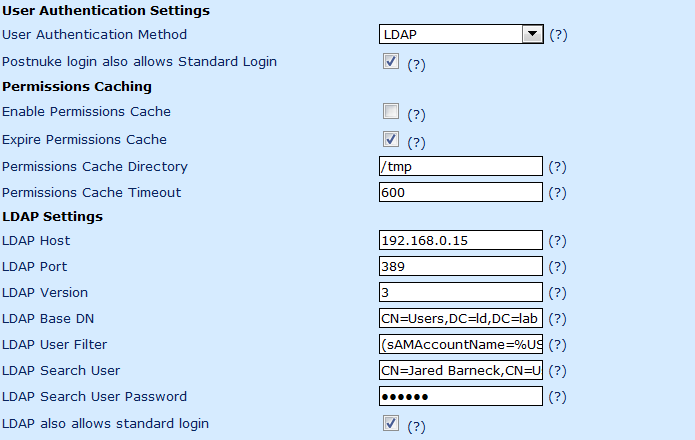
    • User Authentication Settings
    • LDAP Settings

    These section are show in this screen shot. After this screen shot instructions on configuring these sections are provided.

  3. Scroll to the section called User Authentication Settings.
  4. Change the User Authentication Method setting to LDAP.
  5. Configure the LDAP Settings section.
    1. For LDAP Host, Enter the IP address of your Active Directory server.
    2. Do not change the LDAP Port or LDAP Version settings.
    3. On a default Active Directory installation, set the LDAP Base DN to the following:
      CN=Users,DC=YourDomain,DC=tld

      For example, the lab I am demoing this with is LD.Lab so it would be this:

      CN=Users,DC=ld,DC=lab
    4. For LDAP User Filter enter the following:
      (sAMAccountName=%USERNAME%)
    5. For the LDAP Search User, enter a domain user:
      CN=John Doe,CN=Users,DC=ld,DC=lab

      SUGGESTION: Create a service account on the domain with a really intense password and almost no rights, except of course the right to search LDAP so it can be an LDAP Search User.

    6. Obviously for the LDAP Search User Password, enter the password for the LDAP Search User.

      IMPORTANT! You must update this password here when the user’s changes in Active Directory (sorry for the “No duh” moment but it had to be said).

  6. Scroll down and on the bottom right of the Default User Preferences page, click Save.

Go ahead and try to login as a Domain User.

Note On Changing Permissions
Domain Users may appear to get the Administrator role, but this is not really the case. They only get the Anonymous role when they first login. See my forum post here:
How to make an LDAP user an administrator?

Also, it appears that if you want all users who login to get more permissions, then edit the Anonymous role or modify every user individually. (Yeah, so the project needs some features in this area…maybe you want to become a contributor and develop it yourself?)


Copyright ® Rhyous.com – Linking to this article is allowed without permission and as many as ten lines of this article can be used along with this link. Any other use of this article is allowed only by permission of Rhyous.com.

How to add color to your SSH sessions in FreeBSD so files of different types have different colors when using ls?

Hey this was really easy. Really, it is just a matter of aliasing your ls commands. However, it is only really easy if you know how to do it. When you forget, it is annoying. So here is another post to store the info I once knew but forgot and had to learn again.

Using sh, the default shell

  1. Edit your .shrc file in your home folder:
    # ee /usr/home/username/.shrc
  2. Add/Change the alias commands as follows:
    alias ls=’ls -G’
    alias ll=’ls -laFoG’
    alias l=’ls -lG’

    The first one I added, the second two I only added the -G parameter to the already existing aliases for ls.

  3. Save and close the file.
  4. Logout and login and your shell should have colors when you use ls.

Using bash

  1. Edit your .shrc file in your home folder:
    # ee /usr/home/username/.shrc
  2. Add/Change the alias commands as follows:
    alias ls=’ls -G’
    alias ll=’ls -laFoG’
    alias l=’ls -lG’

    The first one I added, the second two I only added the -G parameter to the already existing aliases for ls.

  3. Save and close the file.
  4. Copy the .profile file to .bash_profile.
    # cp /usr/home/username/.profile /usr/home/username/.bash_profile
  5. Edit the .bash_profile and add the following:
    # Source the .shrc
    source .shrc
  6. Logout and login and your bash shell should have colors when you use ls.

Using csh, the default shell for root

  1. As root, edit your .cshrc file in either your home folder or in the home folder for root:

    Your home folder:

    # ee /usr/home/username/.cshrc

    Home folder for root:

    # ee /root/.cshrc
  2. Add/Change the alias commands as follows: (The syntax is slightly different than for sh or bash)
    alias ls ls -G
    alias la ls -aG
    alias lf ls -FAG
    alias ll ls -lAG

    The first one I added, the others I only added the -G parameter to the already existing aliases for ls.

  3. Save and close the file.
  4. Logout and login and your shell should have colors when you use ls.

bash and sh for all users

  1. Edit your .shrc file in your home folder:
    # ee /usr/home/username/.shrc
  2. Add/Change the alias commands as follows:
    alias ls=’ls -G’
    alias ll=’ls -laFoG’
    alias l=’ls -lG’

    The first one I added, the second two I only added the -G parameter to the already existing aliases for ls.

  3. Save and close the file.
  4. Cat this file to /etc/profile.
    # cat /usr/home/username/.shrc > /etc/profile
  5. Logout and login and your shell should have colors when you use ls.

csh for all users

  1. As root, edit your .cshrc file in either your home folder or in the home folder for root:

    Your home folder:

    # ee /usr/home/username/.cshrc

    Home folder for root:

    # ee /root/.cshrc
  2. Add/Change the alias commands as follows: (The syntax is slightly different than for sh or bash)
    alias ls ls -G
    alias la ls -aG
    alias lf ls -FAG
    alias ll ls -lAG

    The first one I added, the others I only added the -G parameter to the already existing aliases for ls.

  3. Save and close the file.
  4. Cat this file to /etc/csh.cshrc.
    # cat /usr/home/username/.cshrc > /etc/csh.cshrc
  5. Logout and login and your shell should have colors when you use ls.

Copyright ® Rhyous.com – Linking to this article is allowed without permission and as many as ten lines of this article can be used along with this link. Any other use of this article is allowed only by permission of Rhyous.com.

How to remove the ^M characters in a file on FreeBSD?

How to remove the ^M characters in a file on FreeBSD?

This is simple:

There are multiple ways to do it. One is actually included in the FreeBSD-tips file:

tr -d \\r < file > newfile
— Originally by Dru

So if you installed the “games” distribution, you get tips every time you log in. And once in a while the above tip will show up.

I had never used that one however, I had always used this one (which I modified) that I found here: http://sed.sourceforge.net/sed1line.txt

sed -i.bak ‘s/^M$//’ filename # in bash/tcsh, press Ctrl-V then Ctrl-M

However, this one works with the sh, tcsh and bash but not with the csh shell.

This one worked on csh but I am not sure if it is recommended as it assumes every line ends with ^M.

sed -i.bak ‘s/.$//’ filename # assumes that all lines end with CR/LF

Anyway, I like how FreeBSD supports the -i parameter. Because if I am doing lots of files, I can have a script that does each file in a directory and then (of course I have a back up just in case) I can run sed -i.bak ‘s/.$//’ filename on each file and then do delete all .bak files so every file “appears to be” edited in place.

How to install dotProject 2.1.2 on FreeBSD 7.2 with Apache 2.2, PHP5, and MySQL 5.1 Server?

How to install dotProject 2.1.2 on FreeBSD 7.2 with Apache 2.2, PHP5, and MySQL 5.1 Server?

The basic overview.

  1. Install FreeBSD.
    How do I install FreeBSD?
  2. Update FreeBSD and download the ports tree.
    What are the first commands I run after installing FreeBSD
  3. Then install Apache + SSL.
    Installing an Apache + SSL on FreeBSD using the ports tree
  4. Then install MySQL.
    How to install MySQL on FreeBSD 7.2 or on Red Hat 5.4?
  5. Configure MySQL to be Unicode.
    How to create a UTF-8 Unicode Database on MySQL and make UTF-8 Unicode the default?Note:
  6. Secure MySQL. I don’t have a post on this, but you can follow these MySQL pages.
    Securing the Initial MySQL Accounts
    General Security Guidelines

    Note: If you know what you are doing, you can go with any database that dotProject supports, such as Postgresql.

  7. Install PHP5and PHP5-Extensions and make sure to include the MySQL extensions and the LDAP extension.
  8. How to install PHP5 and PHP5 Extensions on FreeBSD?

  9. Then install DotProject

I have previous documents about installing each of the steps above installing dotProject. Once you have gone though the above documents, you will be ready for this document. This document will only cover dotProject.

Installing dotProject 2.1.2 from Ports

  1. Install dotProject from ports using one of the following commands (I use the first one when doing virtual hosts and the second one when just using sub directories of the web root).
    #
    #
    cd /usr/ports/www/dotproject
    make install

    Note: If you Apache directory is /usr/local/www/apache22/data you may want to use this make command:

    #
    #
    cd /usr/ports/www/dotproject
    make DOTPROJECTDIR=/usr/local/www/apache22/data/dotproject install

  2. Create a database in MySQL for dotProject. Name it whatever you want. For this example, I am going to name the database dotProjDB. If you have read the articles about MySQL that I referenced above, you should know how to log into to MySQL, but just in case you forgot, I will show you again.There are lots of ways to create a database in MySQL, and I am going to give you one example using the shell and the MySQL client.
    # mysql -u root -p

    Enter your password and you should be taken to a mysql prompt.

    mysql> create database dotprojdb

    Yes it is that simple. And at the same time no it is not that simple. There is a lot more to know such as where to put the database files and how fast of drives you need, whether you need faster read speed or faster write speed or both, but this will suffice for now.

  3. Create a mysql user account for this database. We don’t want to user the root account.
    See this page in the MySQL documentation for more information on this: Adding User Accounts

    mysql> CREATE USER ‘dpuser’@’localhost’ IDENTIFIED BY ‘P@sswd!’;
    Query OK, 0 rows affected (0.01 sec)
    mysql> GRANT SELECT,INSERT,UPDATE,DELETE,CREATE,DROP ON dotprojdb.* TO ‘dpuser’@’localhost’;
    Query OK, 0 rows affected (0.01 sec)

  4. Now open a web browser to your server’s site: http://yourserver/dotprojectYou will see the following page.

    No need to do anything on this page because it should redirect you after 5 second to a dotProject configuration web page.

    Now some of the items in red need to be taken care of. Not all of them, just some of them.

    The first group of items are “Requirements” and anything not with a pretty green check mark under the “Requirements” section needs to be fixed.

    However, under the “Database Connectors” section, there are lots of red Xs. We don’t need to fix these. We just need one database, so as long as the database you want to use (in this example it’s MySQL) has a pretty green check mark, you don’t need to do add more “Database Connectors”.

  5. Fix the first error: Session Save Path writable? X Fatal: session.save_path is not setTo do this, follow these steps:
    1. Change to the directory that contains the php.ini file. On FreeBSD that directory is here: /usr/local/etc
      # cd /usr/local/etc

    2. Now by default the PHP5 port on FreeBSD doesn’t install a php.ini file, but instead provides two example php.ini files: php.ini-recommended and php.ini-dist. So copy one of them to php.ini.
      # cp php.ini-recommended php.ini

    3. Edit the php.ini file and remove the comment from this line:
      ;session.save_path = “/tmp”

      I use ee which is the command to open Easy Editor. But you can use vi or whatever.

    4. Save the file and exit.
  6. The other issue is this one: Session AutoStart = ON? X Failed Try setting to ON if you are experiencing a WhiteScreenOfDeathOk. So this issue is fixed is in that same php.ini file. So repeat the steps only this time we don’t remove a comment, we change a setting from 0 to 1. Find the following line and change it from 0 to 1, as shown.
    session.auto_start = 1
  7. Restart apache. This is required and must be done before these settings will take effect.
    # /usr/local/etc/rc.d/apache22 restart

  8. Now you are ready to click the “Start Installation” button. So go ahead and click it. The following page should appear.
  9. Enter the details as shown in the page. Hopefully you have your own database user and password to use.
  10. Should you click the “User persistent connection?” option? Well, read this. http://www.php.net/manual/en/features.persistent-connections.phpI am not going to check it.
  11. Click “Install db and write config”. It should succeed and you should see this new page.
  12. Now go back to the dotproject home page: http://yourserver/dotprojectLogin with the default user name and password and you are ready to go.

    UPDATE:
    Check out my new update to this:
    How to configure dotProject 2.1.2 to authenticate using Active Directory’s LDAP?


Copyright ® Rhyous.com – Linking to this article is allowed without permission and as many as ten lines of this article can be used along with this link. Any other use of this article is allowed only by permission of Rhyous.com.

How to create a Calendar in QlikView 9?

How to create a Calendar in QlikView 9?

UPDATE: Check out my new calendar here: http://rhyous.com/2009/11/30/my-new-and-improved-calendar-in-qlikview/

Ok, so the fact that I cannot just have one line in a Load Script is a negative for QlikView. In a perfect world, I would have one line that would give me a bunch of possible values I could use for a dimension, such as CalendarDay, CalendarWeek, CalendarMonth, CalendarQuarter, CalendarYear, etc… It would be one line like this:

Calendar(StartDate, EndDate);

Alas…it is not a perfect world, so this feature doesn’t exist in QlikView. (Enhancement Request please!!!!)

So there is a Wiki on how to do it. Here is the link.
http://community.qlikview.com/wikis/qlikview-wiki/how-to-create-a-calendar.aspx

However, the problem is that this didn’t work.

So after some research I remember that internet search engines exist and I don’t have to just search QlikView’s site and documentation. I did a google search for this string:
qlikview how to create a calendar

The script didn’t fail to load…yeah…wait…there is not data in my report that has to do with a Calendar.

This sucks. Why can’t I just create a new Calendar. This is common problem with some software companies. There is a “key features” that can be done, but with great difficulty. However, because it can be done, they don’t spend any more development time on it.

Anyway, I added a post in the QlikView Forum and watched the QlikView free training Video for developers (especially module 8).

Here is the result:

LET vDateMin = Num(MakeDate(2000,1,1));
LET vDateMax = Floor(YearEnd(AddMonths(Today(), 12)));
LET vDateToday = Num(Today());

TempCalendar:
LOAD
$(vDateMin) + RowNo() – 1 AS DateNumber,
Date($(vDateMin) + RowNo() – 1) AS TempDate
AUTOGENERATE 1
WHILE $(vDateMin)+IterNo()-1<= $(vDateMax); MasterCalendar: LOAD TempDate AS CalendarDate, Day(TempDate) AS CalendarDay, WeekDay(TempDate) AS CalendarWeekDay, Week(TempDate) AS CalendarWeek, Month(TempDate) AS CalendarMonth, Year(TempDate) AS CalendarYear, 'Q' & Ceil(Month(TempDate)/3) AS CalendarQuarter, WeekDay(TempDate) & '-' & Year(TempDate) AS CalendarWeekAndYear, Month(TempDate) & '-' & Year(TempDate) AS CalendarMonthAndYear RESIDENT TempCalendar ORDER BY TempDate ASC; DROP TABLE TempCalendar; LET vDateMin = Num(MakeDate(2000,1,1)); LET vDateMax = Floor(YearEnd(AddMonths(Today(), 12))); LET vDateToday = Num(Today()); [/sourcecode] Now when your script loads, you can right click and choose New Sheet Object, Slider/Calendar Object. Choose Calender, not Slider and base it off of the CalendarDate field. Also on the Sort tab, use the Numeric Value to change the sort to Descending.

How to create a directory in C++ in Windows?

How to create a directory in C++?

Ok, so this is another task that should be simple but isn’t. Come on C++ Standards people. C++ has been out for decades and you haven’t figured out how to get all Operating Systems to conform to a single piece of code to make a directory? Write an standard and release it.

This document is for Windows, I will talk about FreeBSD some time later.

If wxWidgets can do it with the filefn.h, why can’t the standard C++ Library?

Supposedly Boost can do it also but the standards people are taking their sweet time getting Boost in.

So here is how it can be done. The headers names are the project types I chose in Visual Studio 2008.

Windows Empty Project

Create a main.cpp and put the following in it.

#include <iostream>
#include <string>
#include <direct.h>
#include <sys/stat.h>

using namespace std;

int main ()
{
	string directoryName = "c:\\programdata\\MyApp";

	struct stat st;
	if (stat(directoryName.c_str(), &st) == 0)
	{
		cout << "The directory exists." << endl;
	}
	else
	{
		int mkdirResult = _mkdir(directoryName.c_str());
		if (mkdirResult == 0)
		{
			cout << "The directory is created." << endl;
		}
		else
		{
			cout << "The directory creation failed with error: " + mkdirResult << endl;
		}
	}
}
&#91;/sourcecode&#93;

<strong>Windows CLR Console Application</strong>

[sourcecode language="cpp"]
#include "stdafx.h"

using namespace System;
using namespace System::IO;
int main()
{

   String^ directoryName = "C:\\ProgramData\\MyApp";
   if ( Directory::Exists( directoryName ) )
   {
	   Console::WriteLine( "The directory exists.");
       return 0;
   }
   else
   {
	   try
	   {
		  DirectoryInfo^ directoryInfo = Directory::CreateDirectory(directoryName);
	   }
	   catch ( Exception^ e )
	   {
		   Console::WriteLine(e->ToString());
	   }
   }
}

Where is telnet in Windows 7? Or Windows 7 is missing telnet.exe

So I opened a command prompt to test that a port is open using the standard practive test:

telnet ipaddress port

For example, I was checking if RDP was open to an address:

C:\Users\jbarneck> telnet 10.1.1.1 3389

However, Windows 7 just complained.

‘telnet’ is not recognized as an internal or external command,
operable program or batch file.

So where is telnet in windows 7? Well, I am first going to check Add / Remove Programs to see if I can add it.

  1. Open Add / Remove Programs. Here is how if you don’t know.
    1. Click on Start.
    2. Type in Add / Remove Programs.
    3. Selecte and start Add / Remove Programs.
  2. I then clicked on “Turn Windows Features On or Off”.
  3. I then found the “Telnet Client” option.
  4. I checked the box and clicked OK.And the Telnet client installed.So I have windows 7 ultimate. I understand leaving telnet off Windows 7 home by default, but I don’t understand why to leave it off of Windows 7 Ultimate. Oh, well. I guess we will just have to enable it ever time when we want it.

How to add an enum or enumeration to a class in C++?

How to add an enum or enumeration to a class in C++?

Obviously this is simple, but I keep forgetting one element or other of the syntax (usually the terminating semi-colon) so I thought if I made a post about it, I would never forget again, and if I did, I could look at my post and remember.

There are certain parts to an enum configuration:

  1. The enum keyword.
  2. The name of the enumerator. I name this one Items just as an example but it can be named anything you want almost (of course you can’t use C++ keywords).
  3. The open bracket: {
  4. The names of the items separated by comas:
    item1, item2, item3
    Each item has an integer value starting at 0 and incrementing by one. Optionally, you can change a value, and again, ever value thereafter will be +1. So if you want to start at 1 instead of at 0, you would put this:
    item1 = 1, item2, item3
    If you wanted to count from 1,2,3 and then 7,8,9 you could do this:
    item1 = 1, item2, item3, item7 = 7, item8, item9
    Also you can change every item by having every item by assigning every item.

  5. The closing bracket: }
  6. A statement closing semicolon: ;

    So the code for your Items enumerator look like this:

    enum Items
    {
        item1 = 1, item2, item3
    };
    

    A basic class is shown here:

    class NewObject
    {
    public:
        // Public members and functions
        NewObject();
        ~NewObject();
    protected:
        // Protected members and functions
    private:
        // Private members and functions
    };
    

    So to add an enum to you need to decide, is it a public, protected, or private enum? I think it is most common to have public enumerations so that is what my example shows.

    class NewObject
    {
    public:
        // Public members and functions
        NewObject();
        ~NewObject();
    
        enum Items
        {
            item1 = 1, item2, item3
        };
    
    protected:
        // Protected members and functions
    private:
        // Private members and functions
    };
    

    Now you can use the enum on any instantiated class.

How to configure Bugzilla to Authenticate to Active Directory?

So I already have an article on installing Bugzilla. See it here:
How to install Bugzilla on a FreeBSD 7.2 with Apache + SSL and MySQL?

So I am not going to cover installing Bugzilla. Just how to get it to connect to Active Directory. Mostly the documentation was there, but there was not really a good example of actual implementation. If the documentation doesn’t provide an example (preferably multiple real world exmaples) then it is poor documentation. Yes, Bugzilla, you are free to take my documentation and put it in your manual, or link to this page.

  1. Gather the information from your production environment, especially the LDAP information for your Active Directory configuration: 
    • Bugzilla Server name: 
      http://myserver/bugzilla


    • The LDAP Servers (Active Directory servers):
      dc1.corp.mydomain.tld, dc2.corp.mydomain.tld


    • The LDAP Bind DN info of a user that can read Active Directory. (This can be any active directory user, as long as this user can read active directory’s users, which pretty much an user no matter how locked down can do.)So my username on the domain is JBarneck, but that is not what to use here. The LDAP Bind DN of my user name is like this (with company secret information changed).
      CN=Barneck\, Jared,OU=MyDepartment,OU=MyCity,DC=corp,DC=MyDomain,DC=tld:MyPasswd!


    • The LDAP Base DN, which is the LDAP information for the OU that your users are in.
      My LDAP Base DN for the OU I am in is this (again with company secret information changed). This is exactly what I pasted into my configuration, backslash and all. 

      OU=MyDepartment,OU=MyCity,DC=corp,DC=MyDomain,DC=tld
    • The LDAPuidattribute, which is sAMAccountName and I don’t know if you can changed in Active Directory.
      sAMAccountName


    Note: I’ll be honest. I didn’t have access to a domain controller or Active Directory so I used a tool called LDAPWhoAmI.exe (with an accompanying ldapinfo.dll) that is included in LANDesk’s Management Suite software. I can’t give you these files. But if you wanted to do a trial of LANDesk Management Suite, you could download a Management Suite trial (which is a gig or so) and extract it and get these files. You don’t have to install, just extract and search for the two files. Copy them to a Windows workstation on your domain, then open a command prompt and change to the directory where LDAPWhoAmI.exe and ldapinfo.dll was copied and run LDAPWhoAmI.exe.

  2. Log into Bugzilla as an administrator. There is not default administrative user for Bugzilla. You should have created a user account as part of the install.
  3. Enable the LDAP module.
    1. Click on Administration from the top menu bar.
    2. Click on Parameters.
    3. Click on User Authentication on the left menu bar.
    4. Scroll down to the user_verify_class setting.
    5. Highlight LDAP and click the up arrow so that it is first in the list. I left DB enabled. I left Radius disabled.
    6. At the bottom of the web page (yes you have to scroll all the way to the bottom) click the Save Changes button.
  4. Configure LDAP to connect to Active Directory.
    1. Click on LDAP on the left menu bar.
    2. Under LDAPserver put your Active Directory servers.
      dc1.corp.mydomain.tld, dc2.corp.mydomain.tld


    3. Under LDAPbinddn put your user’s ldap info.
      CN=Barneck\, Jared,OU=MyDepartment,OU=MyCity,DC=corp,DC=MyDomain,DC=tld:MyPasswd!


    4. Under LDAPBaseDN put your LDAP info for the OU with your users.
      CN=Barneck\, Jared,OU=MyDepartment,OU=MyCity,DC=corp,DC=MyDomain,DC=tld:MyPasswd!


    5. Under LDAPuidattribute put sAMAccountName.

      sAMAccountName


    6. At the bottom of the web page click the Save Changes button.
  5. test Authentication.
    1. Either log out or use a different browser or a different machine and connect to your bugzilla url: 
      http://myserver/bugzilla


    2. Log in using an Active Directory account. I was unsure if I was supposed use an email or my username and it worked using my Domain user name, JBarneck, and my Domain password.

    I hope this helps all of you get Bugzilla to authenticate using Active Directory much faster than if you had to scour the web for problems.


    Copyright ® Rhyous.com – Linking to this article is allowed without permission and as many as ten lines of this article can be used along with this link. Any other use of this article is allowed only by permission of Rhyous.com. 

How to configure Subversion to use Cyrus-SASL2 to authenticate to a MySQL database?

Ok, so I want to have Subversion authentication work from a MySQL database. I am going to try to use Cyrus SASL for this.

I already have instructions for installing the necessary parts:

  1. Install FreeBSD.
    How do I install FreeBSD?

  2. Update FreeBSD and download the ports tree.
    What are the first commands I run after installing FreeBSD

  3. Then install Subversion, however, one difference you need to make to the install instructions for subversion. You need to install with SASL2 support. When you run make install it is an option.
  4. How to install subversion 1.6.6 on FreeBSD 7.2

Ok, now that you have everything is installed, you are were I am and ready to try to get this configured.

Configuring Subversion to use SASL to Authenticate to a MySQL database

  1. Create a simple MySQL database. The following is a simple database creation script that creates a database with one table and two rows.
    CREATE DATABASE UserDB;
    USE UserDB;
    CREATE TABLE `users` ('username' varchar(255), 'password' varchar(255) )
    INSERT INTO users VALUES ('user1','pw1');
    INSERT INTO users VALUES ('user2@MyReal.com','pw2');
    INSERT INTO users VALUES ('user3@myemailaddress.com','pw3');
    

    Note: I use these accounts to show what works and what does not work because the idea of “realms” is confusing.

    You may be asking why I don’t have three rows, one for each item: User, Password, Realm.

    Well, if you really are creating a new database to handle SVN Users then that is how you should do it and here is it is.

    CREATE DATABASE UserDB;
    USE UserDB;
    CREATE TABLE `users` ('username' varchar(255), 'password' varchar(255) , 'realm' varchar(255))
    INSERT INTO users VALUES ('user1','pw1','realm');
    INSERT INTO users VALUES ('user2@MyReal.com','pw2','realm');
    INSERT INTO users VALUES ('user3@myemailaddress.com','pw3','realm');
    

    However, because I am assuming that you want to authenticate to users that are in an already existing database, realm won’t really exist. However, you may have usernames that are in email format, or not in email format an that makes a difference because Subversion splits the username at an @ symbol and the username is only what is before the @ symbol. See the troubleshooting realms section below.

  2. Edit the following file:
    /home/svn/repos/MyApp/conf/svnserve.conf

    # ee /home/svn/repos/MyApp/conf/svnserve.conf

    The following are the lines that should NOT be commented out.

    [general]
    anon-access = none
    auth-access = write
    realm = MyDomain.com

    [sasl]
    use-sasl = true

  3. Create and edit the following file:
    /usr/local/lib/sas2/svn.conf

    # ee /usr/local/lib/sas2/svn.conf

    The following are the lines that should NOT be commented out.

    [general]
    pwcheck_method: auxprop
    mech_list: plain
    auxprop_plugin: sql
    sql_hostnames: localhost
    sql_engine: mysql
    sql_user: root
    sql_passwd: pw
    sql_database: UserDB
    sql_select: SELECT password FROM users WHERE username='%u'

    Note: For debugging add log_level: 7 to this file and then watch the /var/log/debug file.

You should now be able to connect with a client such as TortoiseSVN and connect

Troubleshooting Realms

I found some issues with realms that were really confusing.

Change your /usr/local/lib/sas2/svn.conf file to look like this:

[general]
log_level: 7
pwcheck_method: auxprop
mech_list: plain
auxprop_plugin: sql
sql_hostnames: localhost
sql_engine: mysql
sql_user: root
sql_passwd: pw
sql_database: UserDB
sql_select: SELECT password FROM users WHERE username='%u' or username='%u@%r'

I added two changes:

  1. Turned on logging.
  2. Changes the sql statement to look for username='username' or username='username@realm'

I had to do this because if the user was using an email address, such as john@domain.tld, then it actually makes %u only equal John and seems to drop the @domain.tld and replace it with the name of the realm. However, if your username is John@domain.tld and your realm is domain.tld (so realm and domain are the same), then the code above works. If you domain and realm are not the same, I haven't been able to get this to work.

Go ahead and run this command:

# tail -f -n 30 /var/log/debug

And then try to authenticate using a client, such as TortoiseSVN. Test all three users. You will see the SQL Queries that are run. It should work to authenticate as user1 or User2, but it cannot authenticate user3 because it just doesn't work due to the way it handles realms. If you have users that don't have email address in your realm, then you need them to have username that are not email addresses.

Final Question
If the password is stored as an md5, sha1, sha256 hash in the database, how do I make this work?


Copyright ® Rhyous.com - Linking to this article is allowed without permission and as many as ten lines of this article can be used along with this link. Any other use of this article is allowed only by permission of Rhyous.com.

How to install subversion 1.6.6 on FreeBSD 7.2

How to install Subversion 1.6.6 on FreeBSD 7.2.
The basic overivew.

  1. Install FreeBSD.
    How do I install FreeBSD?

  2. Update FreeBSD and download the ports tree.
    What are the first commands I run after installing FreeBSD

  3. Then install Subversion.

I have previous documents about installing each of the steps above installing Subversion. This document will only cover Subversion.

Installing Subversion on FreeBSD from ports

  1. Go to /usr/ports/devel/subversion and run make install.

    ServerName#
    ServerName#
    cd /usr/ports/devel/subversion
    make install

    NOTE: If you get a failure due to apr already being installed but not being built correctly, then uninstall apr and reinstall it with the default settings. Then go back and try to install subversion again.

    ServerName#
    ServerName#
    ServerName#
    cd /usr/ports/devel/apr
    make deinstall
    make BATCH=yes install

  2. Configure Subversion to start at bootup.

    #
    #
    echo # Subversion >> /etc/rc.conf
    echo 'svnserve_enable="YES"' >> /etc/rc.conf

  3. Create an svn user using the adduser command line wizard. This command will walk you through creating an svn user. Make sure to use the nologin shell and a random password so the user cannot login.

    # # adduser
    Username: svn
    Full name: svn
    Uid (Leave empty for default):
    Login group [svn]:
    Login group is svn. Invite svn into other groups? []:
    Login class [default]:
    Shell (sh csh tcsh nologin) [sh]: nologin
    Home directory [/home/svn]:
    Home directory permissions (Leave empty for default):
    Use password-based authentication? [yes]:
    Use an empty password? (yes/no) [no]:
    Use a random password? (yes/no) [no]: yes
    Lock out the account after creation? [no]:
    Username : svn
    Password :
    Full Name : svn
    Uid : 1002
    Class :
    Groups : svn
    Home : /home/svn
    Home Mode :
    Shell : /usr/sbin/nologin
    Locked : no
    OK? (yes/no): yes
    adduser: INFO: Successfully added (svn) to the user database.
    adduser: INFO: Password for (svn) is: /2CZct48a
    Add another user? (yes/no): no
    Goodbye!

  4. Make a repos directory in the svn user's home directory.

    # mkdir /home/svn/repos

  5. Create a repository.

    #
    #
    #
    #
    cd /home/svn
    mkdir repos
    cd repos
    svnadmin create MyApp

    This will create a MyApp folder and populate it with the files needed to start a repository.

    This is default subversion repository folder structure:

    /home/svn/repos/MyApp/README.txt
    /home/svn/repos/MyApp/format
    /home/svn/repos/MyApp/conf
    /home/svn/repos/MyApp/confauthz
    /home/svn/repos/MyApp/conf/passwd
    /home/svn/repos/MyApp/confsvnserve.conf
    /home/svn/repos/MyApp/db
    /home/svn/repos/MyApp/db/current
    /home/svn/repos/MyApp/db/format
    /home/svn/repos/MyApp/db/fs-type
    /home/svn/repos/MyApp/db/fsfs.conf
    /home/svn/repos/MyApp/db/min-unpacked-rev
    /home/svn/repos/MyApp/db/rep-cache.db
    /home/svn/repos/MyApp/db/revprops
    /home/svn/repos/MyApp/db/revs
    /home/svn/repos/MyApp/db/transactions
    /home/svn/repos/MyApp/db/txn-current
    /home/svn/repos/MyApp/db/txn-current-lock
    /home/svn/repos/MyApp/db/txn-protorevs
    /home/svn/repos/MyApp/db/uuid
    /home/svn/repos/MyApp/db/write-lock
    /home/svn/repos/MyApp/db/revprops/
    /home/svn/repos/MyApp/db/revprops/0
    /home/svn/repos/MyApp/db/revprops/0/0
    /home/svn/repos/MyApp/db/revs/
    /home/svn/repos/MyApp/db/revs/0
    /home/svn/repos/MyApp/db/revs/0/0
    /home/svn/repos/MyApp/db/transactions/
    /home/svn/repos/MyApp/db/txn-protorevs/
    /home/svn/repos/MyApp/hooks/
    /home/svn/repos/MyApp/hooks/post-commit.tmpl
    /home/svn/repos/MyApp/hooks/post-lock.tmpl
    /home/svn/repos/MyApp/hooks/post-revprop-change.tmpl
    /home/svn/repos/MyApp/hooks/post-unlock.tmpl
    /home/svn/repos/MyApp/hooks/pre-commit.tmpl
    /home/svn/repos/MyApp/hooks/pre-lock.tmpl
    /home/svn/repos/MyApp/hooks/pre-revprop-change.tmpl
    /home/svn/repos/MyApp/hooks/pre-unlock.tmpl
    /home/svn/repos/MyApp/hooks/start-commit.tmpl
    /home/svn/repos/MyApp/locks/
    /home/svn/repos/MyApp/locks/db-logs.lock
    /home/svn/repos/MyApp/locks/db.lock
  6. To configure a Repository and add users, edit the following file:
    /home/svn/repos/MyApp/conf/svnserve.conf

    # ee /home/svn/repos/MyApp/conf/svnserve.conf

    Uncomment lines below or just create a new svnserve.conf file with these lines:

    [general]
    anon-access = read
    auth-access = write
    password-db = /home/svn/userdb

    Now edit the following file:
    /home/svn/repos/MyApp/passwd

    # ee /home/svn/repos/MyApp/passwd

    Add users. For example, to add a user allen1 with a password of P@sswd! and another user jared with a password of My$ecre+1, the file would look like this:

    [users]
    allen1 = P@sswd!
    jared = My$ecre+1
  7. Now start the svn server.

    # /usr/local/etc/rc.d/svnserve start

  8. Now you should be able to connect to your repository with an svn client. TortoiseSVN is a popular windows tool that you can use to connect to your repository.

    Use the following to connect:

    svn://allen1:P@sswd!@ServerName/MyApp

Now i have to figure out a bunch more steps...
How to populate an SVN repository?
How to configure Subversion to use Cyrus-SASL2 to authenticate to a MySQL database?
How to configure Subversion to use Cyrus-SASL2 to authenticate to a MySQL database where the password is stored in a hash? So you can have SVN share Bugzilla users?
How to get Tortoise SVN to connect to an SVN repository?
How to install WebSVN as a web interface to the SVN repository?


Copyright ® Rhyous.com - Linking to this article is allowed without permission and as many as ten lines of this article can be used along with this link. Any other use of this article is allowed only by permission of Rhyous.com.